
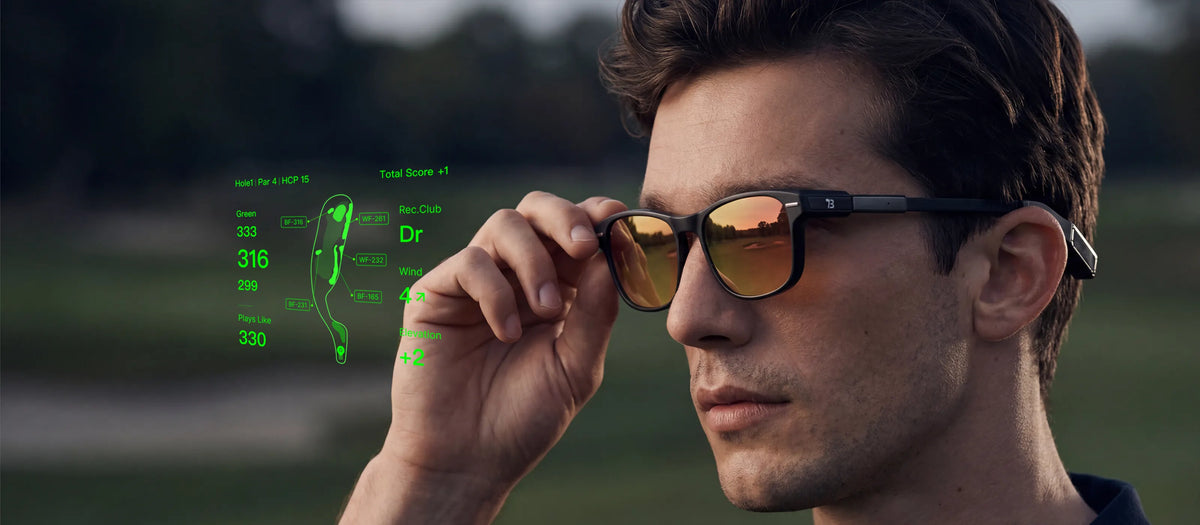
A golf GPS app can show the shape of the hole, distances to hazards, green depth, pin position, and how current conditions may affect the shot.
The interruption often comes from accessing that information. You reach into a pocket, open the map, locate the relevant number, and then look back toward the course.
BirdiLens AR golf glasses are designed to shorten that sequence by bringing selected course information into the golfer's field of view.
Yes. AR golf glasses can display selected GPS yardages, hazards, and shot context while the golfer continues looking toward the course. The information is still there when needed, but checking it no longer has to become a separate screen interaction before every shot.
Course data and connected features require the BirdiLens app.
Keep the Hole in Front of You
Consider a tee shot on a dogleg where the landing area disappears behind a rise.
From the tee, you can see the opening section of fairway, but not the bunker around the corner or the point where the landing area begins to narrow. A course map reveals the full layout, although the golfer still has to connect that map with the terrain ahead.
An eyes-up display can make that comparison more immediate. The fairway shape and selected hazard distances appear while the actual hole remains in view.
The advantage is not a new type of yardage. It is a more natural way to reference the information.
The golfer can study the line, identify the available landing area, and choose a target without repeatedly shifting attention between the course and another screen.
See the Number the Shot Actually Needs
The distance to the flag is not always the number that determines the shot.
Imagine an approach with the following yardages:
Plays-like distance: about 169 yards. Uphill terrain and the current conditions make the shot play longer than the raw pin number.
Seeing only the 164-yard pin distance could lead to a different decision from seeing the entire landing window. The bunker carry, available room behind the pin, and adjusted playing distance all help explain what the shot requires.
BirdiLens can present selected information such as front, center, and back green distances, hazard carries, hole layout, wind context, and plays-like distance. The display does not need to show everything at once. It only needs to answer the question in front of the golfer.
Can the selected club cover the bunker? Is there room behind the flag? Would the center of the green provide the better target?
Golfers already combine multiple golf distance tools for this reason. The value of AR is that the most relevant result can appear closer to the shot itself.
When the Approach Becomes a Putt
The same eyes-up approach can continue on the green.
AI putting support is designed to surface slope, aim points, and plays-like putting distance. This gives the golfer another visual reference when reading the green, while feel, starting line, pace, and execution remain part of the stroke.
Designed to Look at Home on the Course
Golf technology is easier to use when it feels like part of the round rather than another device to manage.
BirdiLens follows the profile of performance eyewear instead of a conventional headset. A streamlined frame, tinted lenses, and display components integrated into the temples give the glasses a familiar on-course appearance.
Inside the lens, a compact green display presents selected information while leaving the surrounding course visible. The goal is not to fill the golfer's vision with data. It is to place a small amount of useful information where it can be checked quickly.
That balance matters from the first tee to the walk back to the clubhouse. The glasses retain the look of golf eyewear while adding a discreet digital layer when the round calls for it.
Let the HUD Match the Moment
A golfer does not need the same amount of information throughout the entire pre-shot routine.
Read the Shot
Distances, hazards, and course context can appear while the golfer studies the terrain and considers the available options.
Build the Plan
The selected information remains available while the golfer chooses a target, club, and intended shot.
Move Into the Swing
As planning turns into execution, the HUD can reduce its presence or clear from view.
BirdiLens is designed to use motion and action awareness to recognize the transition from reviewing information to preparing for the shot. The golfer can also select which content appears and hide the display manually.
This creates a quieter interaction: information while reading the shot, followed by a clearer view when it is time to swing.
It is one reason golf's next screen may not feel like a conventional screen.
Use the Control That Fits the Moment
A golfer may be carrying a club, pulling a cart, wearing a glove, or standing in wet conditions when information is needed.
Quick Glance
A glance may be enough to check the front of the green or another selected distance.
Voice
A voice request may be more convenient for navigating the hole or recording a score when the golfer's hands are occupied.
Button or Touch
Physical controls remain available when a direct input feels more natural for the moment.
Selected calls, messages, and notifications can also remain accessible between shots.
The intention is not to reproduce an entire mobile interface inside the glasses. It is to make useful communication available without letting it dominate the golf view.
Bring Practice Data to the Course
GPS data describes the hole. Personal practice data helps describe the golfer.
When historical carry information is available in the BirdiLens system, it can be combined with the current course situation:
| Information Source | What It Contributes |
|---|---|
| Practice history | Personal carry ranges and recurring club performance |
| Course context | GPS yardages, hazards, elevation, and playing conditions |
| Golfer judgment | Lie, confidence, current shot pattern, and acceptable miss |
A club suggestion can then reflect both the plays-like distance and how the golfer's clubs have performed during previous practice.
The recommendation remains something to evaluate. A club may cover the required distance on paper, but the lie, target, wind, confidence, and cost of the normal miss can still change the choice.
That distinction is explored further in When an AI Golf Caddie Gives You the Data, Who Makes the Shot?
The Information Moves. The Decision Stays Yours.
AR golf glasses change how course information reaches the golfer.
The detailed map can remain in the app. Selected distances and hazards can appear in view. Practice history can provide personal context. The HUD can become quieter as the golfer moves into the swing.
The fundamentals of the shot remain familiar: study the situation, choose the target, select the club, and make the swing.
BirdiLens is designed to make the information easier to reach without making the technology the center of the round.
Not just the number. The shot.
See how BirdiLens brings selected course information into the golfer's field of view.
Explore BirdiLens AR Golf Glasses
Share:
How Long a Round of Golf Usually Takes