
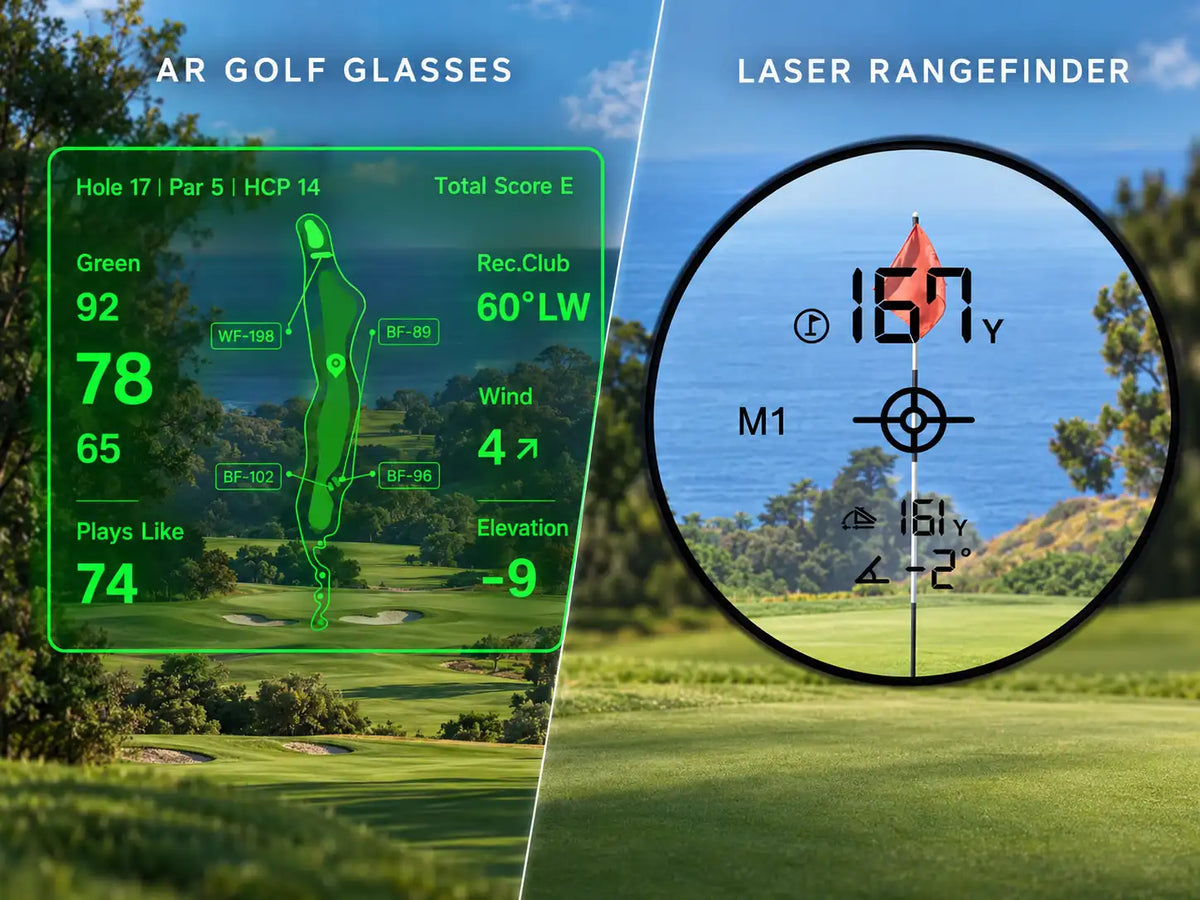
Golf smart glasses do not automatically replace a laser rangefinder. A laser measures distance to a visible target, while many golf glasses display GPS-based yardages from a connected system. Glasses may reduce how often you reach for a device, but a laser can still help confirm a specific flag or target. Whether you need both depends on which distances you use.
You’re looking at a flag on the back of the green. Your glasses show the green distances, and your rangefinder is clipped to the bag. Do you still need to take it out?
On that approach, perhaps. On the next tee, where the fairway bends out of sight, the map may be more useful. The answer changes with the shot.
Start With the Source of the Distance
“Golf smart glasses” describes how information reaches you. It doesn’t tell you how the number was obtained.
A laser rangefinder sends a signal toward a visible target and measures the return. GPS-based systems use a position and mapped course points to calculate yardages. Those results can appear on a phone, watch, or glasses. Additional sensors may support slope or other adjustments, but an adjusted number is still distinct from a measured target distance.
Before comparing products, check what produces each reading. Does the system locate you through the phone or another receiver? Is the target a mapped point, a manually positioned pin, or something directly measured?
Some rangefinders also include GPS maps. If you own one, glasses may change how you access information that is already available to you.
Measuring a Visible Flag
When you want the distance to the flag you can see, a laser has a clear job. Raise it, aim, acquire the target, and read the yardage. It doesn’t need the course map to know where the hole was cut that morning.
Correct targeting matters. Trees behind the green can produce a different reading if the device picks up the background. Follow the model’s aiming and target-confirmation instructions, and repeat a reading that doesn’t fit the scene. Flag-lock features help with acquisition, but their indicators and operation vary.
With GPS glasses, check what the displayed flag represents. A pin icon may mark a default position or a location selected in the app. Some GPS systems let you move it, but a manual estimate doesn’t independently verify the cup’s position. A center-green yardage remains a center-green yardage, even when the flag is elsewhere.
Viewing Hazards and Blind Landing Areas
Now put a rise between you and the landing area. You can’t see the creek crossing the fairway, much less aim at its far bank.
A GPS map can provide distances to mapped features without a direct view. That’s useful for checking a dogleg, identifying a layup area, or understanding where trouble narrows the fairway. Glasses can make selected parts of that information available while you face the hole.
Check which point the number describes. Distance to the near edge of water doesn’t tell you what it takes to clear the far edge. A bunker marker may identify one mapped point rather than the carry along your intended line.
Maps also have limits. Don’t assume a newly reshaped bunker, temporary obstruction, or daily pin movement has been updated automatically.
A laser can measure a visible tree or bunker lip in this situation. It cannot directly measure the hidden creek through the hill. If a combined laser/GPS device shows that creek distance, the GPS function is supplying it.
What You Do Between Shots
Using a laser usually means retrieving it, lifting it to your eye, aiming, reading, and putting it away. For one visible flag, that can be a straightforward check. Several targets require several acquisitions.
Glasses change the viewing step. Once the system is ready, supported information can appear without lifting a separate device to your eye. You may still need to select the course, adjust a target, change the view, or manage settings in an app. The number of phone interactions depends on the product and task.
Try the sequence you actually use: reach the ball, check the required distance, choose a club, and clear the display before addressing the ball. See how naturally the controls fit that process, including when wearing a glove.
The golf pre-shot checklist can help you identify which information deserves a check in the first place.
Accuracy Depends on the Question
Suppose your glasses show 154 yards to the green center and your laser gives 166 to a back flag. These illustrative readings differ by 12 yards, but they refer to different locations. The difference alone doesn’t establish that either device is inaccurate.
Compare the same target and type of distance before judging the result. A slope-adjusted playing distance is also different from an unadjusted yardage.
For GPS, position and the mapped target both matter. For a laser, the reading must come from the intended object. More digits on a display don’t resolve a mismatch between what you measured and what you meant to measure.
Our Golf GPS vs. Rangefinder guide explains the broader differences between the two methods.
Buying One Device or Keeping Both
Before replacing a working rangefinder, notice how you use it over a few rounds. Are most readings to flags, or are you trying to work out hazards and landing areas? Which checks would a mapped yardage answer well enough?
That gives you a better buying test than comparing feature totals. Glasses may cover your routine needs, or they may complement a laser you use selectively.
Include the full setup in the decision: glasses, phone requirements, any lens options, and the rangefinder you plan to retain. Charging and carrying requirements vary by model; some lasers use replaceable batteries, while others need recharging.
If you already have reliable tools, try the new viewing method before selling them. You can decide whether the overlap is useful after seeing which device you actually reach for. The guide to using multiple golf distance tools explores that approach.
Where BirdiLens GV1 Fits
BirdiLens GV1 brings front, center, and back green distances, hazard information, and selected course details into an eyes-up display. It works with the BirdiLens app and offers voice and gesture controls for supported functions.
That makes it relevant when mapped course information is useful but repeated phone checks don’t suit your routine. If direct flag measurement remains important, evaluate GV1 alongside your laser.
A Practical Decision Table
| Your main need | A practical setup | What to confirm |
|---|---|---|
| Measure a specific visible flag | Keep a laser rangefinder | You can acquire and confirm the intended target reliably |
| Understand blind holes and landing areas | Consider GPS glasses or another mapped GPS device | Course coverage and the mapped points available |
| Check basic green distances quickly | Use the display you find easiest to read | Glasses add enough convenience beyond your current app or watch |
| Combine mapped context with direct pin measurements | Consider glasses plus your existing laser | You regularly use both kinds of information |
| Keep spending and equipment to a minimum | Keep the setup that already answers your usual questions | The extra display solves a recurring problem before buying |
Frequently Asked Questions
Do golf smart glasses measure the flag themselves?
Not necessarily. Check whether the model has independent ranging hardware, uses a mapped pin location, or displays a reading supplied by another device.
Do you still need a rangefinder with golf GPS glasses?
Keep one if direct measurements to visible flags or other targets matter to you. Mapped green and hazard distances may cover the needs of other golfers.
Can a rangefinder measure a target you cannot see?
A laser needs an unobstructed path to the target. A rangefinder with GPS may show a mapped distance to a hidden feature through its GPS function.
Is the number in golf glasses always the pin distance?
No. It may refer to the green center, an edge, a hazard, or a selected pin position. Read the label and check the target setting.
Share:
When Golf Smart Glasses Are Worth Adding to Your Setup